Details
-
Type:
Bug
-
Status:
Closed
-
Priority:
Major
-
Resolution: Duplicate
-
Affects Version/s: 3.5.1
-
Fix Version/s: None
-
Component/s: App Within Minutes
-
Labels:
-
Difficulty:Unknown
-
Similar issues:
XWIKI-9113Dashboard created with App Within Minutes not loading after upgrade to 5.0 XWIKI-7795 The browser back button doesn't restore unsaved changes in step 2 of App Within Minutes wizard XWIKI-7110Implement a first version of the class editor that will be used by App Within Minutes XWIKI-8757 Support 2 roles for users for app within minutes: application creator and data creator XWIKI-1283Remove PDF export debug logs XWIKI-476In form select option fields the label property should be the display value and not the value XWIKI-5968 Dynamically created charts (chart macro) are not displayed in exported PDF XWIKI-7665Display embedded SVG images in the PDF export XWIKI-347Extend DBListClass to accept value/label pairs queries XWIKI-1052 PDF forms export
Description
To reproduce:
- Create an application with app within minutes
- Create an entry of that application
- export it in pdf using the export -> export to PDF menu
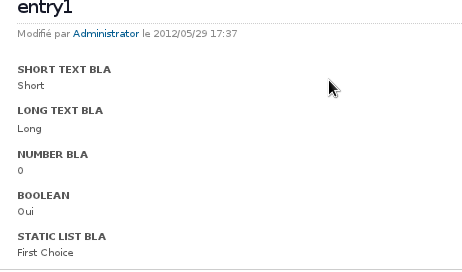
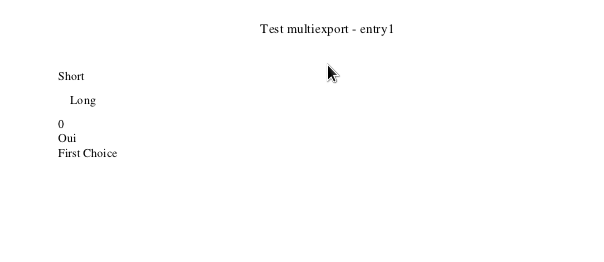
You'll notice that in pdf the labels are not displayed, only the values (see the 2 attachments for comparison)
Issue Links
- duplicates
-
XWIKI-7666
<label> elements don't appear in exported PDFs
-
Actually the issue is caused by the fact that the labels of the fields in app within minutes generated sheet are html label elements (
), and xhtml2fo.xsl, which we use to transform xhtml to xsl-fo (which is then output as pdf), is ignoring the label elements, since there is no equivalent in xsl-fo (or at least that's what the comment in xhtml2fo.xsl says). The fix would be to modify xhtml2fo.xsl to transform the label elements in the same way in which it transforms a span element (semantically, a label is a span with some special properties to attach it to an input).