Uploaded image for project: '{RETIRED} Curriki'
  1. {RETIRED} Curriki
  2. CURRIKI-882 Implement Search and Browse Spec (From Google Docs)
  3. CURRIKI-1029

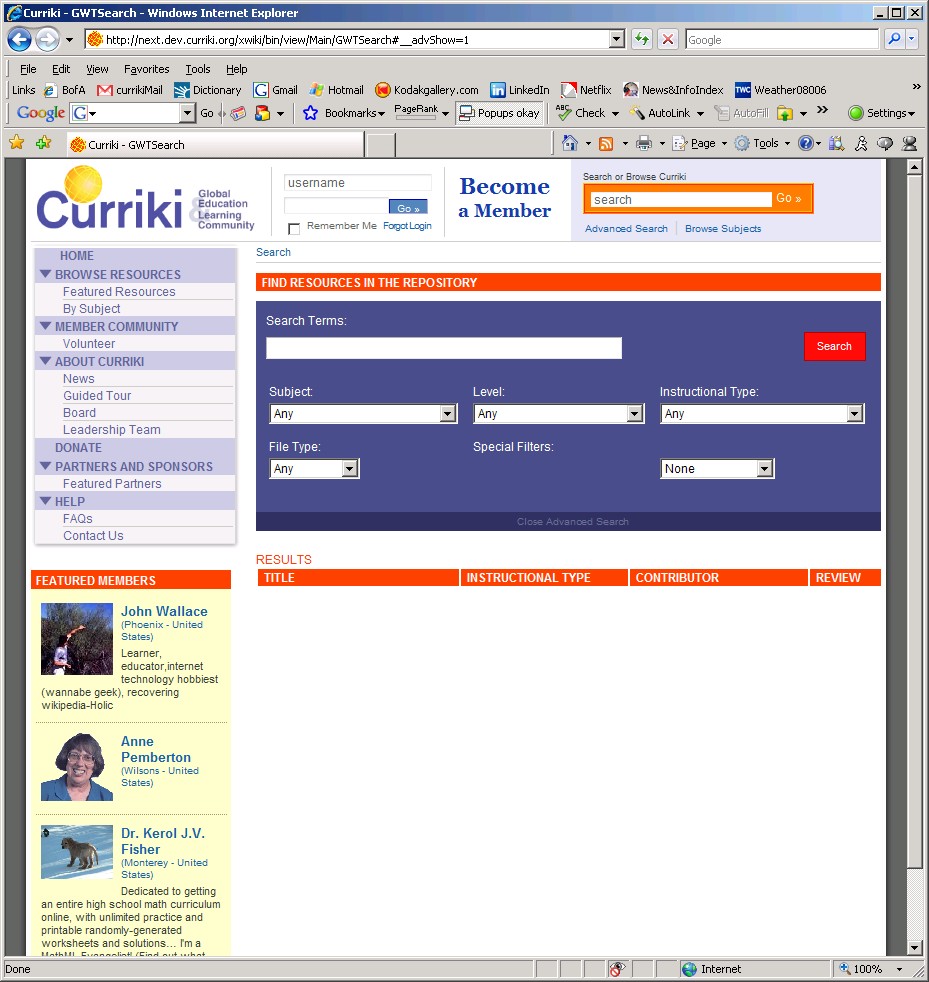
in main site and CB advanced search, special filters drop-down is not lined up with "Special Filters" header in purple search box

    XMLWordPrintable

Details

    • Sub-task
    • Resolution: Fixed
    • Blocker
    • 1.3
    • 1.3
    • Search
    • None

    Description

      1) Open main site.
      2) Click "Advanced Search" in header.

      Please see the attached screen shot for main site view. Same is happening in CB.

      This is true in IE7 on PC.
      Attachments

        Activity

          People

            harry Hariharan Ganesan
            jklb1231 Jen Lytle
            Votes:
            0 Vote for this issue
            Watchers:
            0 Start watching this issue

            Dates

              Created:
              Updated:
              Resolved: