Uploaded image for project: '{RETIRED} Curriki'
  1. {RETIRED} Curriki
  2. CURRIKI-4493

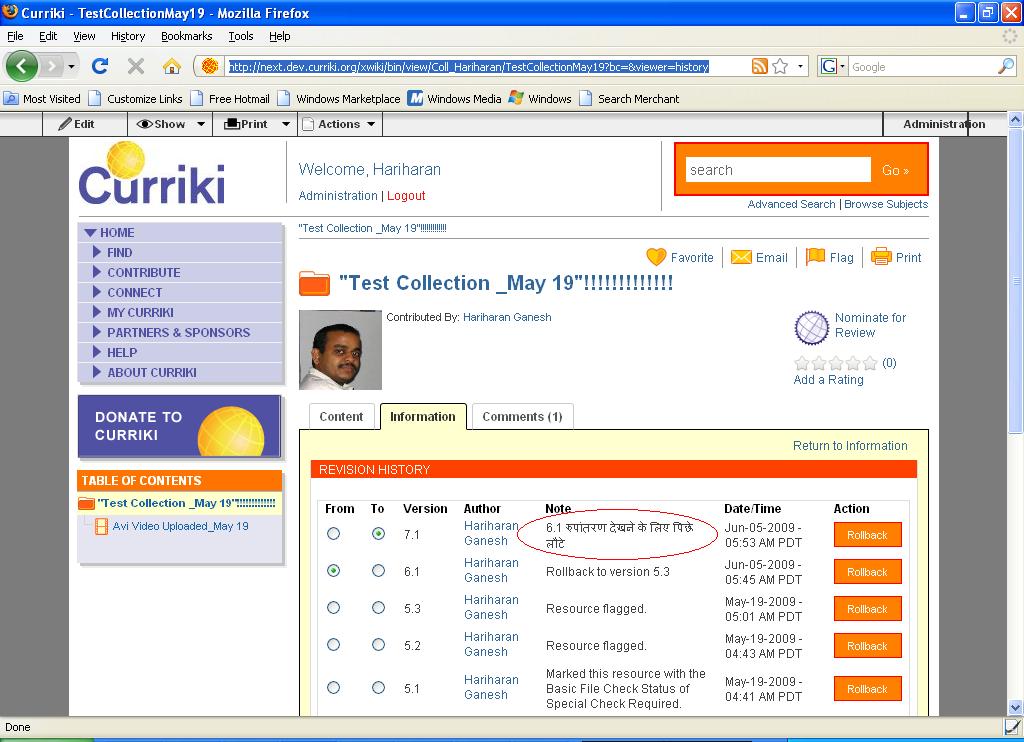
Next >Admin changes the language to Hindi > Revision History > Roll Back to any Version >Now Admin changes the Language from Hindi to Engish>My Curriki >My Collection >Revision History>still below the Title " Note " the comment is displayed in HINDI

    XMLWordPrintable

Details

    • Bug
    • Resolution: Won't Fix
    • Major
    • 1.8.4
    • None
    • None
    • None

    Description

      Step :1
      -----------
      Logged in as Admin

      Admin changes the language to Hindi

      My Curriki >My Collection

      Click on any Collection

      Information Tab >Revision History

      Roll Back to any Version

      Below the Title "Note" the comment is displayed in Hindi

      Now the Admin changes the Language from HINDI TO ENGLISH

      Follow the same steps as mentioned above ,still below the Title " Note " the comment is displayed in HINDI(It should be displayed in English)

      http://next.dev.curriki.org/xwiki/bin/view/Coll_Hariharan/TestCollectionMay19?bc=&viewer=history
      Attachments

        Activity

          People

            toddsherman Todd Sherman
            pradeep PradeepKumar
            Votes:
            0 Vote for this issue
            Watchers:
            0 Start watching this issue

            Dates

              Created:
              Updated:
              Resolved: