Details
-
Sub-task
-
Resolution: Fixed
-
 Critical
-
None
-
None
Description
Testing on Current
1. Select to Join through Facebook
2. Select Corporate Member Type and submit
Bug
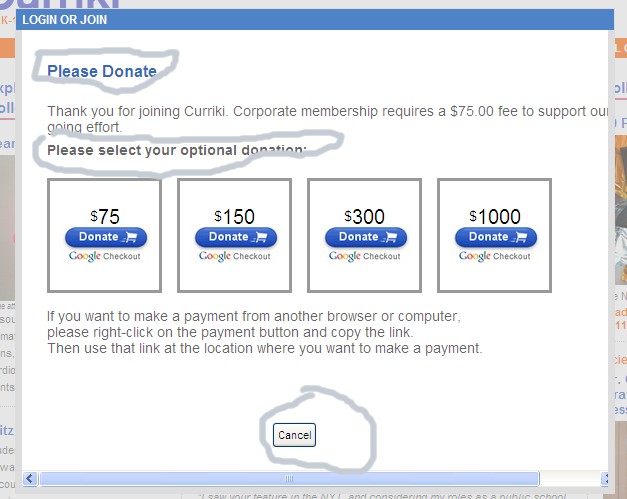
The Corporate Dialog is displaying a mix of translations. Some are from Member Donate and some are from Corporate Membership.
#CORPORATE MEMBERSHIP SELECT PAYMENT FORM 1.10.6
join.complete.corporate.title=Corporate Membership
join.complete.corporate.text=Thank you for joining Curriki. Corporate membership requires a $75.00 fee to support our on-going effort.
join.complete.corporate.header=Please Select Your Membership Level:
join.complet.corporate.later_button=Edit Profile
join.complet.corporate.cancel_button=Log-Out & Pay Later
join.complete.corporate.membertype=Not a corporation? Select the Edit Profile button to change your member type.
join.complete.corporate.membertype.link=Edit Profile
join.complete.donate.let-others-pay = If you want to make a payment from another browser or computer,<br/> please right-click on the payment button and copy the link. <br/>Then use that link at the location where you want to make a payment.