Details
-
Bug
-
Resolution: Fixed
-
 Blocker
-
1.9
-
Windows 10 Pro 64 bit, Chrome 76, using a local instance XWiki 11.3.3 on PostgreSQL 11, Jetty
-
Unknown
-
Description
STEPS TO REPRODUCE
- Install Publication Workflow Application
- Create and add users for the required groups: Contributors, Moderators, Publishers, Viewers and Commenters
- Add 'PublicationWorkflow.PublicationWorkflowPanel' to a left/right panel
- Go to Administer Wiki > Look & Feel > Navigation Panel and add 'PublicationWorkflow' to 'Navigation' section
- Create a new Publication Workflow Config page from Template (and add a default Draft Space)
- Login with a Contributor
- Create a new page (P1) with some content as child of the Main Page (or under any page other than the chosen Drafts page)
- While on that page, in the Workflow panel, click 'Advanced options' and select a Publish Location (e.g. Sandbox)
- Click 'Start workflow'
EXPECTED RESULTS
The workflow is started. A message "Current status: Draft" is displayed.
ACTUAL RESULTS
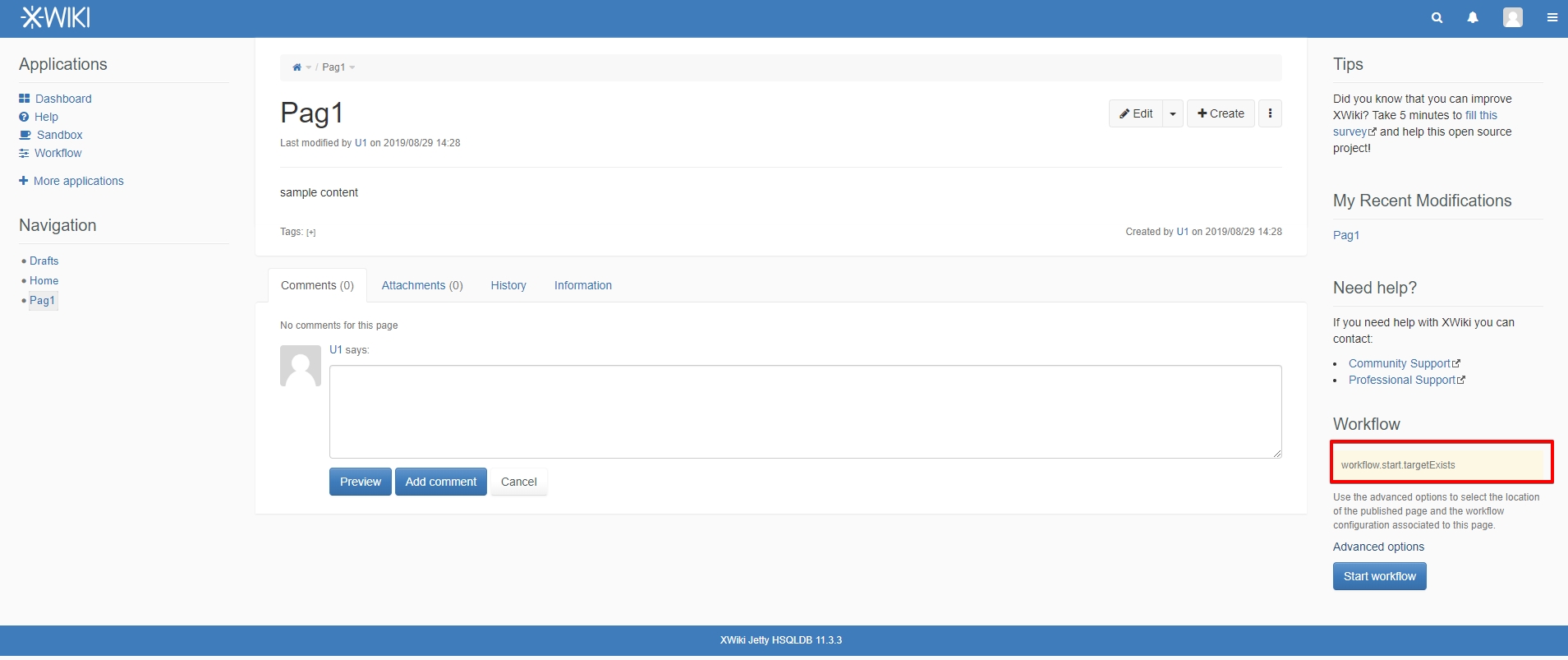
Instead of the confirmation message, a string is displayed:
workflow.start.targetExists
and the workflow is not started. The P1 page doesn't become hidden and is not listed under Overview > List of draft documents livetable.
However, if the page P1 is created as child of the chosen Drafts page, the confirmation message is displayed and the workflow is started.
The issue could not be reproduced on Publication Workflow Application 1.8.1.