Details
-
Bug
-
Resolution: Unresolved
-
 Major
Major
-
None
-
17.10.0
-
None
-
Windows 11 Pro, Firefox 145, using an instance of XWiki 17.10.0 on Oracle 19c, Tomcat 11.0.14
-
Unknown
-
Description
Steps to reproduce
- Go to the search page
- Search for a word, e.g. "wiki"
- From "Filter your search" facets, expand a filter that has a custom date interval, like "Creation date"
- Click on "Custom date & time interval" (or select its checkbox)
- Input a start date and an end date
- Click "Apply" button
- Uncheck the tick box for the created filter
- Click again on "Custom date & time interval" (or select its checkbox)
- Click in a date input box to trigger the date picker
- Repeat steps 4 to 9 (sometimes it needs several tries to reproduce the issue)
Expected results
The date picker is displayed properly (having the standard horizontal width) and when mouse hovering, the dates are highlighted.
Actual results
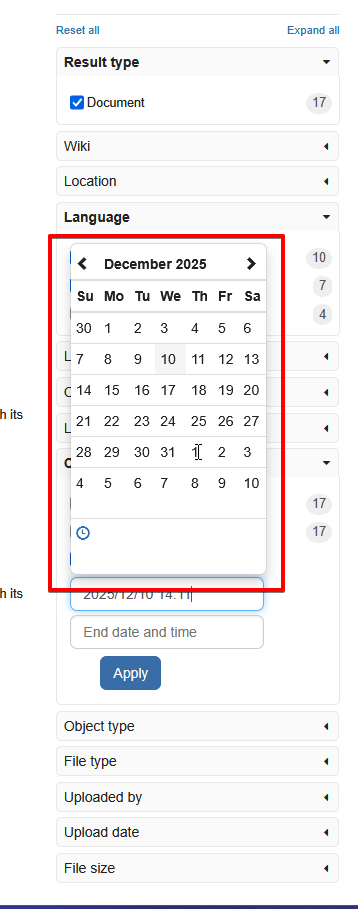
The date picker is displayed with a smaller horizontal width, the time picker icon is on the left side and when mouse hovering over the dates, they are not highlighted anymore.
Also, when opening the time picker, its layout is broken.
No errors in JS console or XWiki logs.
On my side I've reproduced the issue sometimes the first time, and sometimes I needed several tries to be reproduced (as seen in the attached video).