Details
 Major
Major Description
Steps to reproduce
- Configure the Mail Sending section from Administration to be able to send emails
- Go to Administer Wiki > Users & Rights > Registration
- Set 'Use Email Verification' to Yes and 'Save'
- Logout
- Click 'Register'
- Fill in the details for a new user and an email address
- Click 'Register'
- Click 'Log-in'
- Observe the email received by the user
Expected results
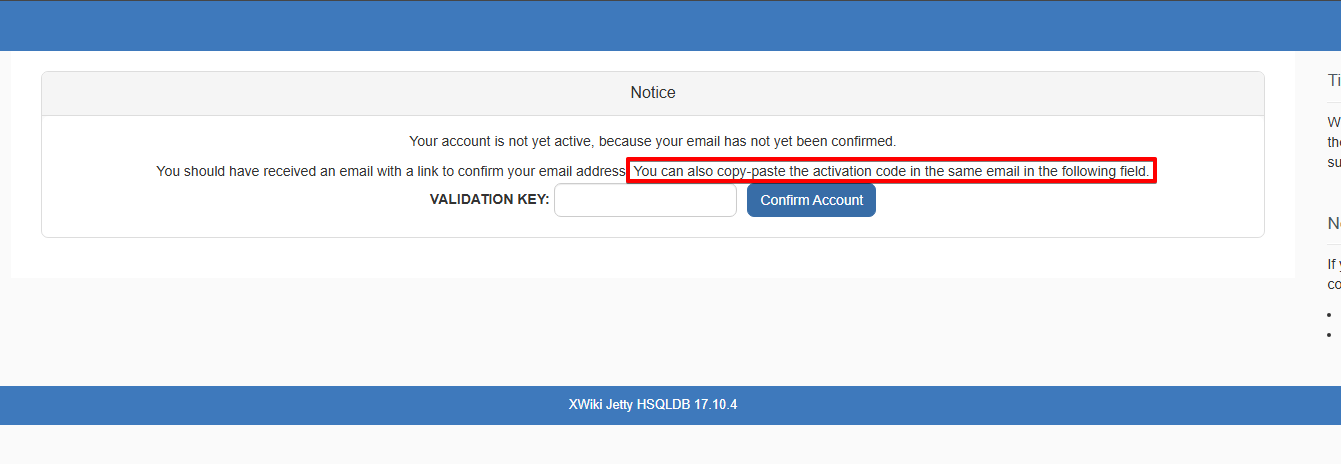
Since after clicking 'Log-in', the user lands on a page with a Validation Key input field and a 'Confirm account' button, a validation code is expected to be present in the email received.
Also, just above the Validation Key input field it says:
You can also copy-paste the activation code in the same email in the following field.
Actual results
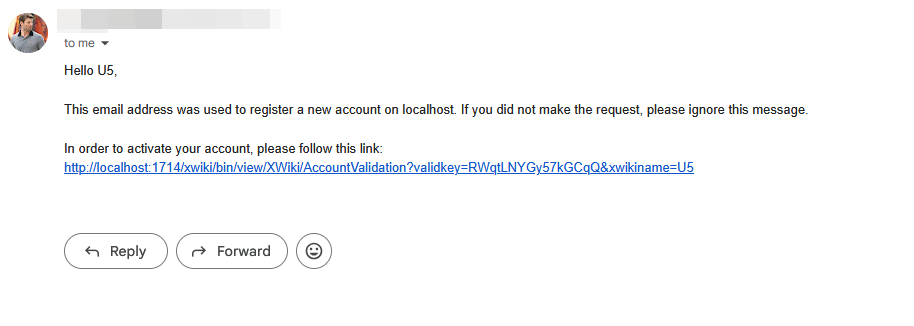
The activation key is not displayed standalone in the email received, but it's only part of the registration link:
<server>/xwiki/bin/view/XWiki/AccountValidation?validkey=RWqtLNYGy57kGCqQ&xwikiname=U5
We should display the validation code in standalone mode in the email body and inform the user that the account activation can be made by accessing the link or by pasting the activation key in the Validation Key input field on the wiki page.